Creating an event
Dates, venue, capacity and who can see it — plus the publish step people forget.
Quick answers
9 questions · click to openCan I list an event without taking RSVPs?
Yes. At the top of Capacity & Settings, turn off Take RSVPs — capacity, waitlist and form options hide. The event still appears on your public site, but without a registration form, and there is no attendees list in the dashboard.
Does the event go live as soon as I save it?
No. An event starts as a draft and stays invisible until you publish it, so you can build it over a few days without anyone seeing a half-finished page.
How do I find someone on the attendee list?
Type a name or email into the search box above the list on the event page, or on the Attendees tab, then press Search or Enter.
Are event times in my timezone or the event's?
The event's own. Every event carries a timezone, so an event in Perth reads correctly to someone looking at it from Brisbane — which matters more than you'd think once you have local groups in different states.
What happens when we hit capacity?
You can turn on a waitlist, so people can still register their interest instead of hitting a dead end.
Can an event be limited to one local group?
Yes. Events are scoped to a division like everything else, so a local group can run its own without it appearing on everyone else's list.
Do RSVPs come into Cobber?
Yes, straight onto the person's record. That's the point — someone who comes to an event becomes someone you can email, call and invite again.
Can I cancel an event?
Yes. Cancelling is a status of its own, distinct from deleting, so the record and its RSVPs stay intact. You’ll be asked whether to email confirmed attendees and waitlisted people — that message is on the event’s Emails tab.
Can I customise how the event looks when shared on Facebook or X?
Yes. On the event's Socials tab you can set the title, description and image used in search results and when someone shares the link — the same idea as the Socials tab on pages.
An event is the thing that turns a list into a room full of people. It’s also the easiest way to find out who your genuinely committed supporters are.
-
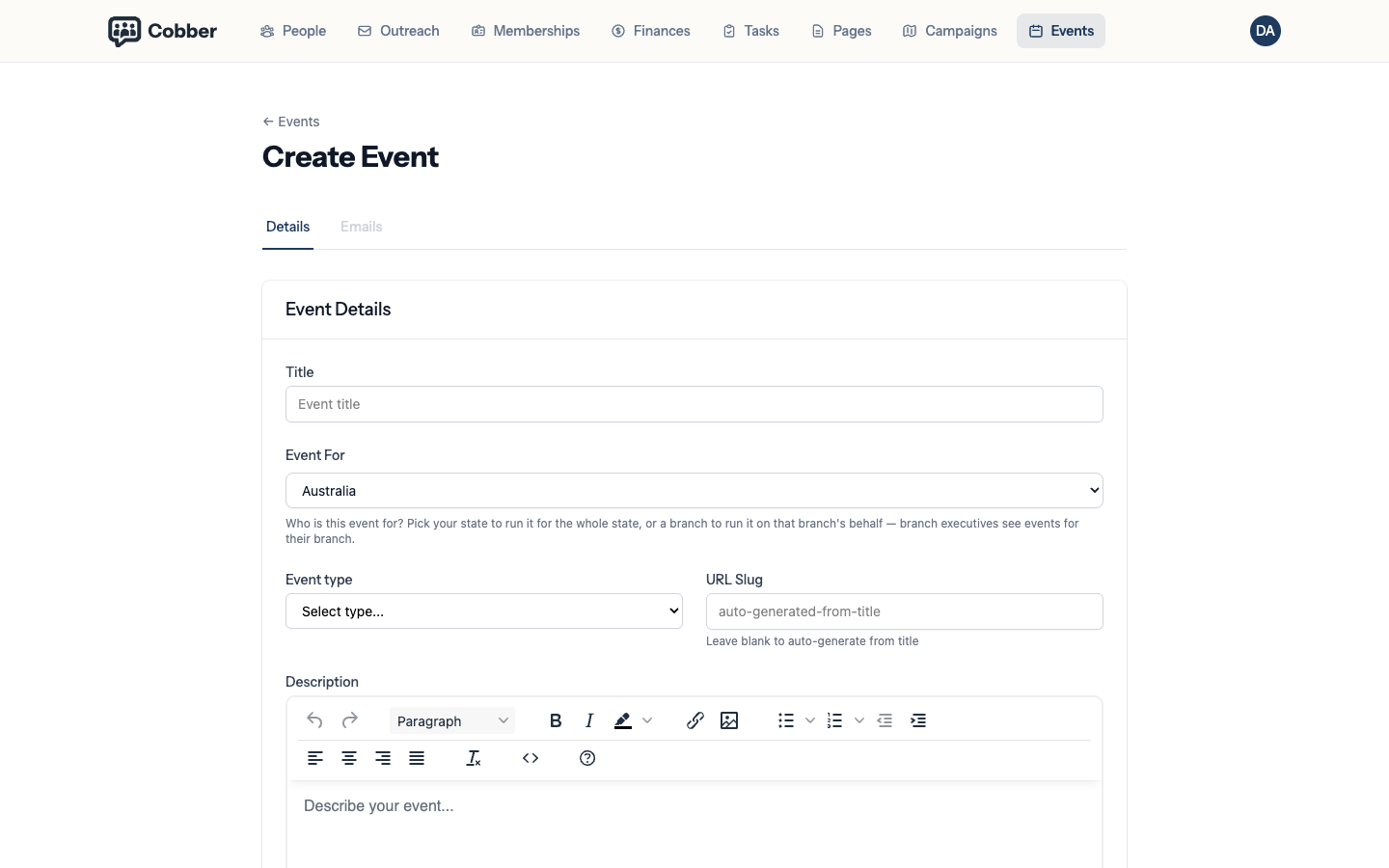
Fill in the event details
Name, description and images under Event Details. The description is what a supporter reads before deciding to come, so write it for them rather than for your committee.
Creating an event. -
Set the date, time and timezone
Date & Time takes a start and an optional end. Every event carries its own timezone, so set it to where the event actually is — not where you are.
-
Add the location
Location is what people will put into their maps app on the day. Be specific: a building name without a street address is the most common reason people arrive late.
-
Set capacity and the waitlist
Under Capacity & Settings, cap the numbers if the room has a limit, and turn on Enable waitlist when full. A waitlist keeps interested people in the conversation instead of turning them away.
If you only want to advertise the event — a rally, a public meeting, something people turn up to without booking — turn off Take RSVPs at the top of Capacity & Settings. Capacity, waitlist and RSVP form options hide when it's off. The public page still lists the event; it just has no registration form, and the dashboard has no attendees list.
You can also attach custom questions to the RSVP form — dietary requirements, accessibility needs, age confirmation, and so on. See custom questions on the RSVP form.
-
Publish it
This is the step people forget. Until you publish, the event exists only for you — nothing is visible and nobody can RSVP. Once it's live, this is what a supporter sees.
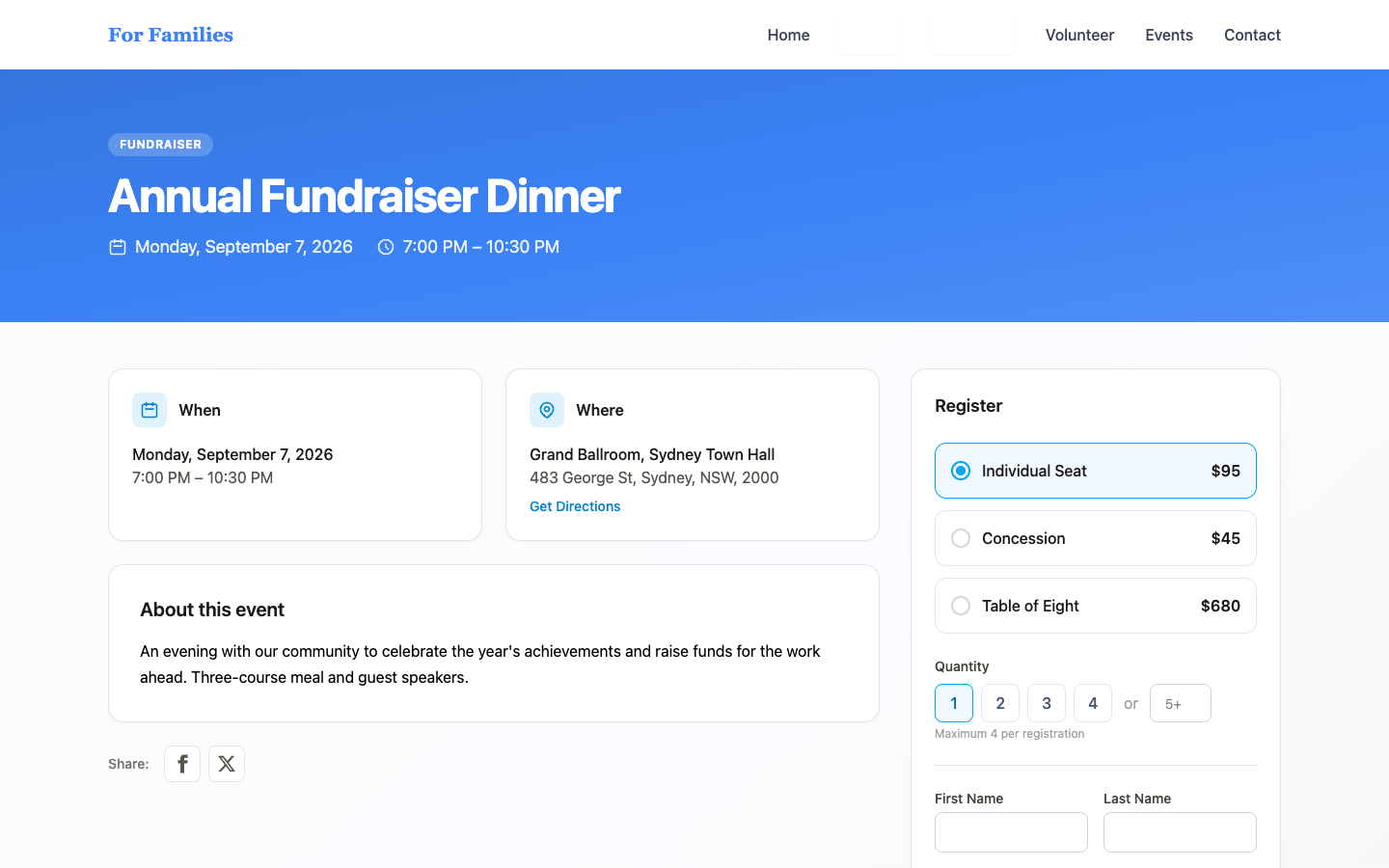
The published event on your public site, with the RSVP form.
Who can see it
Events are scoped to a division, like everything else in Cobber. A local event belongs to that local group, so it appears for the people it’s relevant to rather than on every supporter’s list.
The division you choose under Event For is also what ties the event to that branch on your public website. Set it to a branch and your website theme can show a link from the event page back to the branch running it, so someone who found the event can go on to find the branch. Leave it at a state or national division — for a party-wide event — and no branch link appears. This is separate from the Hosted by field, which is free text that prints as-is and links nowhere.
Social sharing and search
After you save the event, the Socials tab (next to Details and Emails) lets you set how the event looks in Google and when someone pastes the link into Facebook, LinkedIn or X. Meta title, description and image, Open Graph tags, and Twitter/X card fields are all there — leave any blank and Cobber falls back to the event title, a plain-text excerpt of the description, and the cover image.
After you publish
RSVPs flow straight onto the person’s record, which is what makes the event worth running as more than an evening. Afterwards you can email everyone who came, ring the ones who seemed keen, and invite the same group to the next one.
The attendee list on the event page — and the full list on the Attendees tab — has a search box at the top. Type a name or email, then press Search or Enter, and the list filters to matches. On the event page, Add attendee sits in the ⋯ menu next to Search.
Emails
The event’s Emails tab is where you write what attendees receive: registration confirmation, waitlist, ticket receipt, reminders, and the cancellation notice. Each one starts from your organisation default and can be customised for this event.
If you cancel the event, you can choose whether to email confirmed attendees and waitlisted people. That checkbox is on by default. Uncheck it if you have already told people another way. Edit the wording on the Emails tab first if you want to say why, or to give a new date.
| Symptom | Cause and fix |
|---|---|
| Nobody can see the event | It's still a draft. Publishing is a separate step from saving. |
| Times look wrong to some people | Check the event's timezone. It should be the event's location, not the organiser's. |
| Confirmation emails aren't arriving | Event emails depend on a verified sending domain, like everything else. See authenticating your sending domain. |
| The event needs to be called off | Cancel it rather than deleting it — that keeps the RSVPs. You’ll be asked whether to email confirmed attendees and waitlisted people (the cancellation email is on the Emails tab). |
| The shared link preview looks wrong | Open the event's Socials tab and set the title, description and image you want platforms to show. Changes can take a while to refresh in Facebook or X's own cache. |