Receipts and refunds
What a donor gets automatically, how to send a receipt for a recorded payment, and how to refund without breaking your reporting.
Quick answers
8 questions · click to openDo donors get a receipt automatically?
Yes, for online donations — a receipt goes out when the gift succeeds, using the receipt email set up on the donation page. For a payment you record by hand (cash, cheque, bank transfer), Email receipt to donor is ticked by default on the Record a payment form, so a receipt goes out then too unless you untick it.
Can I change what the receipt email says?
Yes — the Receipts tab on the donation page holds the whole email: subject, greeting, body, closing and button. That letter goes out for online donations. The receipt details themselves (amount, date, transaction ID) and the PDF are fixed. A payment you record by hand, or Send receipt from Finances, is a short thank-you with that same PDF attached.
How do I send a receipt for a cash or bank transfer donation?
When you Record a payment, leave Email receipt to donor ticked. If the person already has an email, that address is used. If they do not, you can type one in — it is saved on their record. Open an existing payment and use Send receipt to send or resend later.
Can I refund from inside Cobber?
Yes. Open the payment and use Confirm refund. It processes through Stripe, so you do not need to go there separately.
What happens to the record after a refund?
The payment stays on the person with a status of refunded, along with when and why. Nothing is deleted, so your history stays honest.
Does a refund change our totals?
Yes, and it should. A refunded payment drops out of every total that counts successful payments, including campaign revenue, so your reporting reflects money you actually kept.
Can I refund part of a donation?
A refund is actioned against the payment as a whole from the payments screen. For anything more complicated, handle it in Stripe and note it against the payment.
Someone wants a receipt again.
Open their payment and use Send receipt. You can also Download receipt for the PDF. Do not take a second donation to trigger one.
Receipts go out on their own; refunds need a person. Both leave a trail, which is the point.
What the donor receives
When an online donation succeeds, Cobber sends the receipt email set up on the donation page. A payment you record by hand sends a short thank-you — “Thank you for your payment” — with the same PDF receipt attached (amount, date, transaction ID, payment method, tax notice), if Email receipt to donor is ticked, which it is by default.
If your organisation is set up as tax deductible, that setting carries through to the receipt — check your own status rather than assuming. Tick Tax deductible on the Record a payment form when that applies to the gift you are logging.
Editing the receipt email
The Receipts tab on the donation page holds the whole email, not just an intro line: subject, greeting, body, closing and the button. Write it the way you would thank someone, because that is what it is — for a lot of donors it is the only thing you will send them that month.
What you cannot edit is the receipt itself. The details block — amount, date, transaction ID — and the attached PDF are added automatically at send time, and appear in the editor as a locked placeholder. That is deliberate: the wording is yours, the part a donor hands to their accountant is not.
Receipts are email, so they depend on your sending domain being verified. An unverified domain means no receipts, which is the sort of thing you find out from an annoyed donor.
Sending or resending from the payment
Open the payment and use Send receipt. You will be asked to confirm before it goes out — the same prompt whether this is the first send or a resend. The email is a short thank-you with the PDF attached, the same for a donation or an event ticket. Download receipt is still there when you want the PDF yourself. Someone who pays for an RSVP still gets the event’s own ticket receipt automatically; Send receipt from Finances does not reuse that letter.
If the person has no email, Send receipt is unavailable until there is an address on their record. When you are recording the payment, you can type one in on the form — only if they do not already have an email; an existing address is used as-is.
Refunding
-
Find the payment
Open Payments and filter down to the donation — by person, date, amount or campaign.
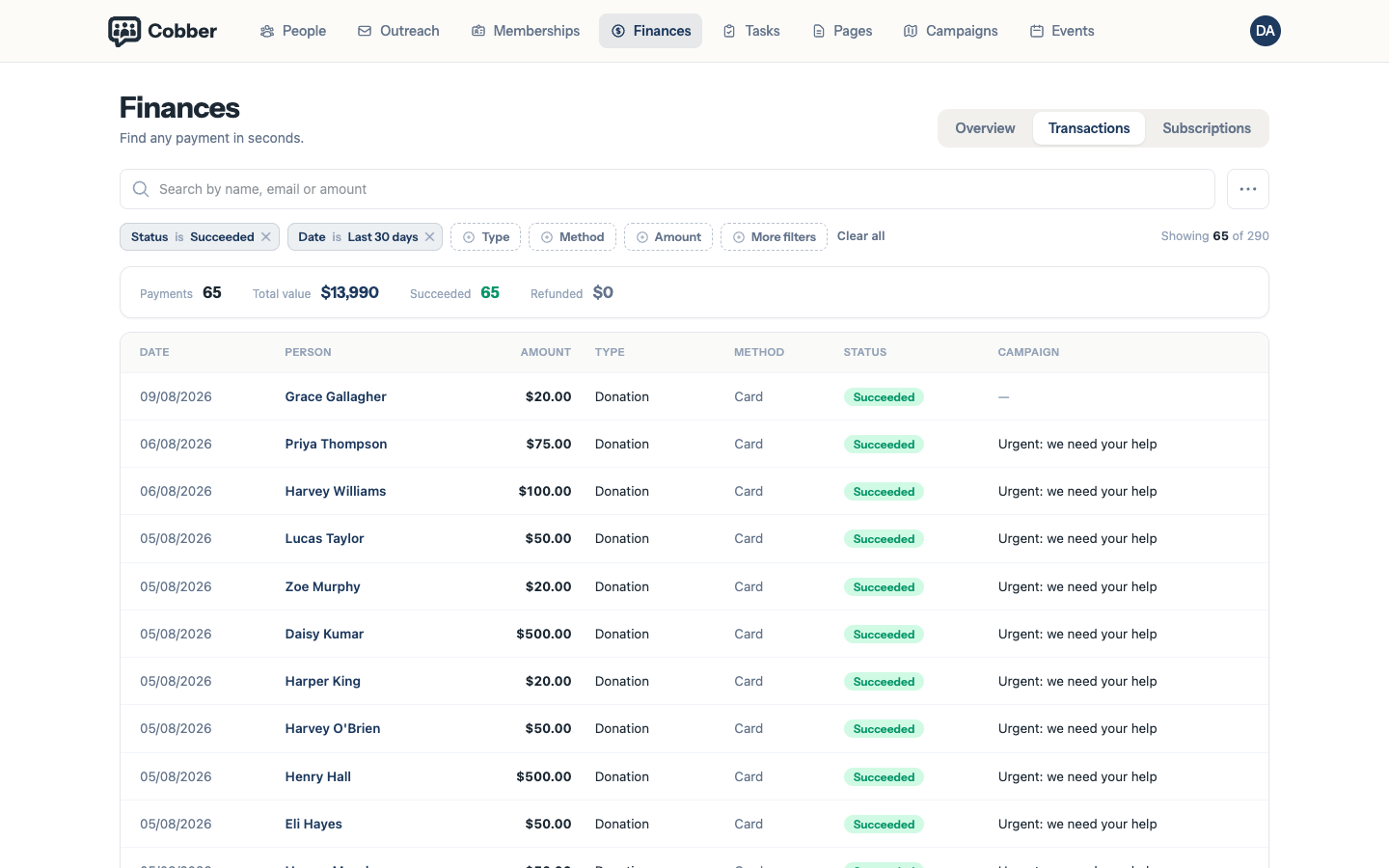
The payments screen, filtered to find a donation. -
Refund it
Confirm refund processes it through Stripe. You do not need to open Stripe separately, and you should not do both.
The receipt on the payment is always Cobber's own PDF — Finances does not link out to Stripe receipts. Use Send receipt to email it, or Download receipt for the PDF.
-
Leave a note
Use the internal note to record why. Six months later, in an audit or a conversation with a treasurer, the reason matters more than the amount.
What a refund does to your numbers
The payment moves to a status of refunded and keeps the date and reason. It then drops out of every total that counts successful payments — donation totals, campaign revenue, the lot.
That’s deliberate. Your reporting should show money you actually kept, and a refunded gift is money you didn’t. The record stays on the person so the history is still there when someone asks.
Refund in Cobber, not in Stripe. Refunding directly in Stripe moves the money but leaves the payment looking successful here, and your totals will be wrong until someone notices.