Adding and editing people
Names, contact details, address and the fields that quietly do the most work.
Quick answers
8 questions · click to openCan someone have more than one email address?
Yes. A person has a primary address and can carry others alongside it, and an import will match on any of them — which is what stops a work address creating a second record.
Why does the address matter so much?
Because Cobber works out each person’s electorates from it, and electorates are what put them in the right local group. Filling in an address is what makes local organising work later.
Does filling in a public form overwrite someone's address?
Only if they type a new one. If they leave the address blank on a volunteer form, event RSVP or embed, their existing profile address is kept. Contact and petition forms only fill an address when the profile doesn't already have one.
Do I have to fill everything in?
No. A name and one way to contact them is enough to start. The rest can arrive from an import, a form they fill in, or a conversation.
What if we track something Cobber has no field for?
Add a person custom field under Custom Fields in your avatar menu. Defined fields appear in their own section on Add/Edit and on the profile; an import can fill them too. See Person custom fields in the help centre.
What are email preferences?
Which kinds of email a person is willing to receive. They’re per category, so someone can opt out of your newsletter and still get urgent alerts.
What happens when I delete someone?
The record is soft-deleted, so their donation and membership history stays intact rather than leaving holes in your finances.
Why don't I see every email open on someone's profile?
The Activity Timeline defaults to Highlights, which hides email opens, sends, clicks and page views so donations, RSVPs and when they joined stay visible. Switch to All, or Email, to see the quieter events. You can show 25, 50 or 100 at a time.
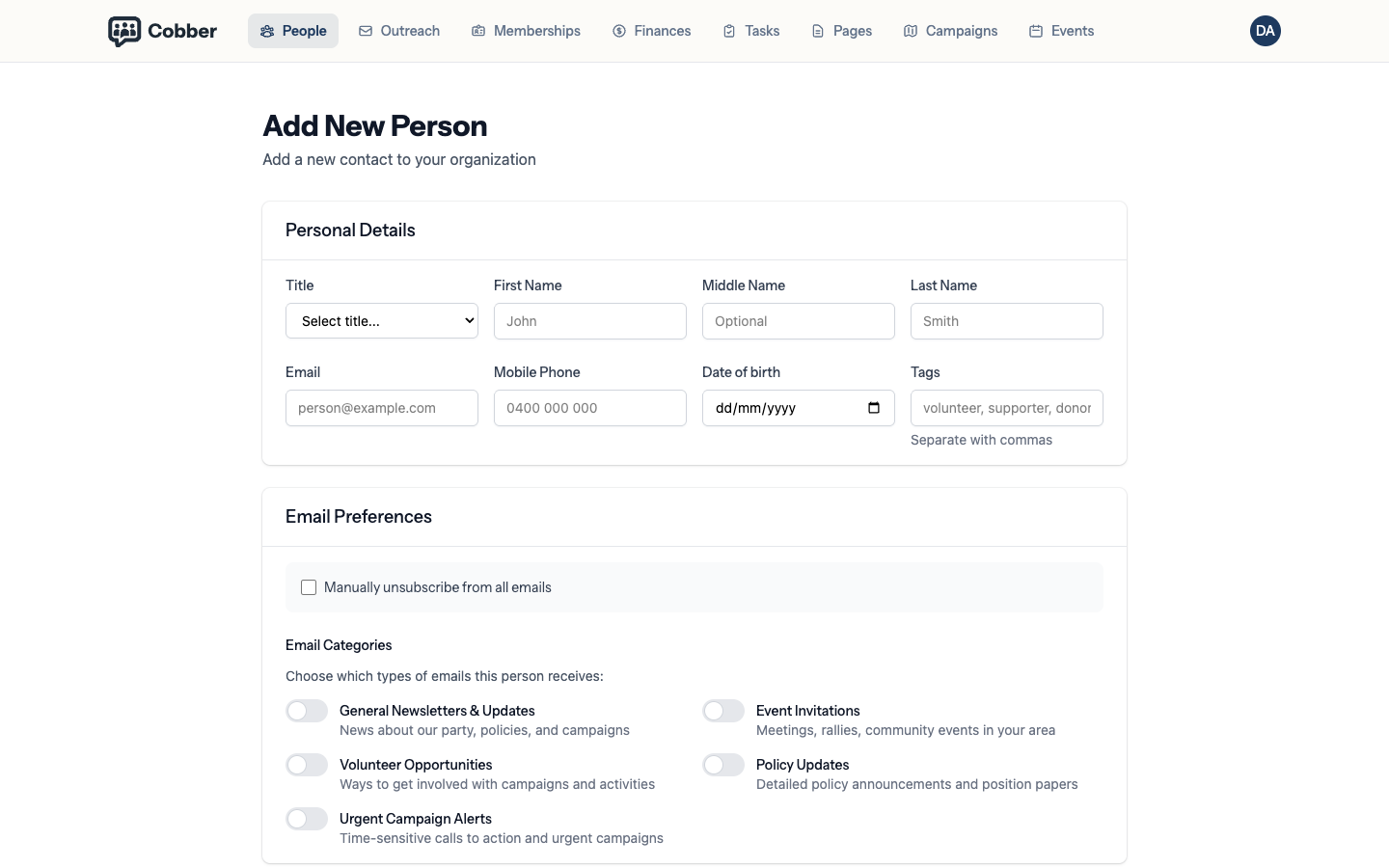
Most people arrive by import or by filling in a form, so adding one by hand is usually a phone call you’re writing up. Add New Person takes a minute.
What the form asks for
| Section | What goes in it |
|---|---|
| Personal Details | Name, email, phone numbers and date of birth. |
| Residential Address | Street, suburb, state and postcode. |
| Email Preferences | Which categories of email they’re happy to receive. |
| Custom field groups | Your organisation’s defined person custom fields (one card per group). |
| Additional Fields | One-off key/value pairs on this person only (Add New Person). |
The address does more than you’d think
It’s tempting to skip. Don’t — Cobber uses the address to work out a person’s federal electorate, state electorate and LGA, and those are what put them into the right local group automatically. A supporter with no address is a supporter your local organisers can’t find.
A postcode alone is enough to get started. The more complete the address, the more precise the result.
A supporter who already has an address on their profile keeps it if they submit a volunteer form, event RSVP or embed without entering one. If they do type an address on those forms, that becomes their profile address. Contact and petition forms only fill an address when the profile doesn’t already have one.
Phone numbers
There are separate fields for mobile, home and work. The mobile one matters most: it’s what SMS uses, and it’s the fallback an import matches on when there’s no email address.
Custom fields
If you track something Cobber has no home for — a membership number from an old system, a local group nickname, a skill — define a person custom field rather than putting it in a notes field where nothing can filter on it. Set them up under Custom Fields in your avatar menu; they then appear on every contact. See Person custom fields for the full walkthrough.
Deleting someone
Deleting soft-deletes the record. They disappear from your lists and your campaigns, but their donation and membership history stays attached rather than leaving a hole in your finances. If someone asks to be removed entirely, email support rather than doing it yourself, so it’s handled properly.
Activity timeline
On a person’s profile, the right-hand Activity Timeline is every recorded engagement — joining, donating, RSVPing, a logged call, a campaign email.
It defaults to Highlights, which hides the noisy stuff (email opens, sends, clicks, page views, receipt emails) so you can still find a join date or a gift when they’ve had a lot of campaign mail. Events shows RSVPs and check-ins; Donations shows gifts and recurring donations; Email is the full send / open / click trail. Use All if you want every event.
There are more than 25 events? Page through them, or choose 50 or 100 — the same Show control as Recent Activity on the dashboard.